Themes and fonts
One palette file recolours every app, on both systems. Browse them in the gallery. The full guide is chapter 7 of the manual.
$ theme              # list themes
$ theme vapor        # apply one everywhere
$ changebg           # the theme's wallpaper again
$ changebg image.png # any image, or a directory
$ font-preset pixel  # pixel fonts, Latin + Chinese
$ font-preset bubble # hand-drawn fonts
$ set-en-font "Family" [px]
$ set-cjk-font "Family" [px]
theme writes generated files that are not in git: ~/.config/theme/ (current theme, X resources, Emacs, Neovim, zathura and kitty colours), the alacritty and dunst theme files, Firefox's theme-colors.css, the cursor themes, a VS Code theme extension, the Claude Code theme and the fcitx5 skin.
Keymap
Home-row modifiers and layers, the same on Linux (keyd) and macOS (Karabiner rules generated from the same keyd.conf). Drawn by keymap/draw.py in homerow-keymap. The window-manager keys are on the Linux and macOS pages.
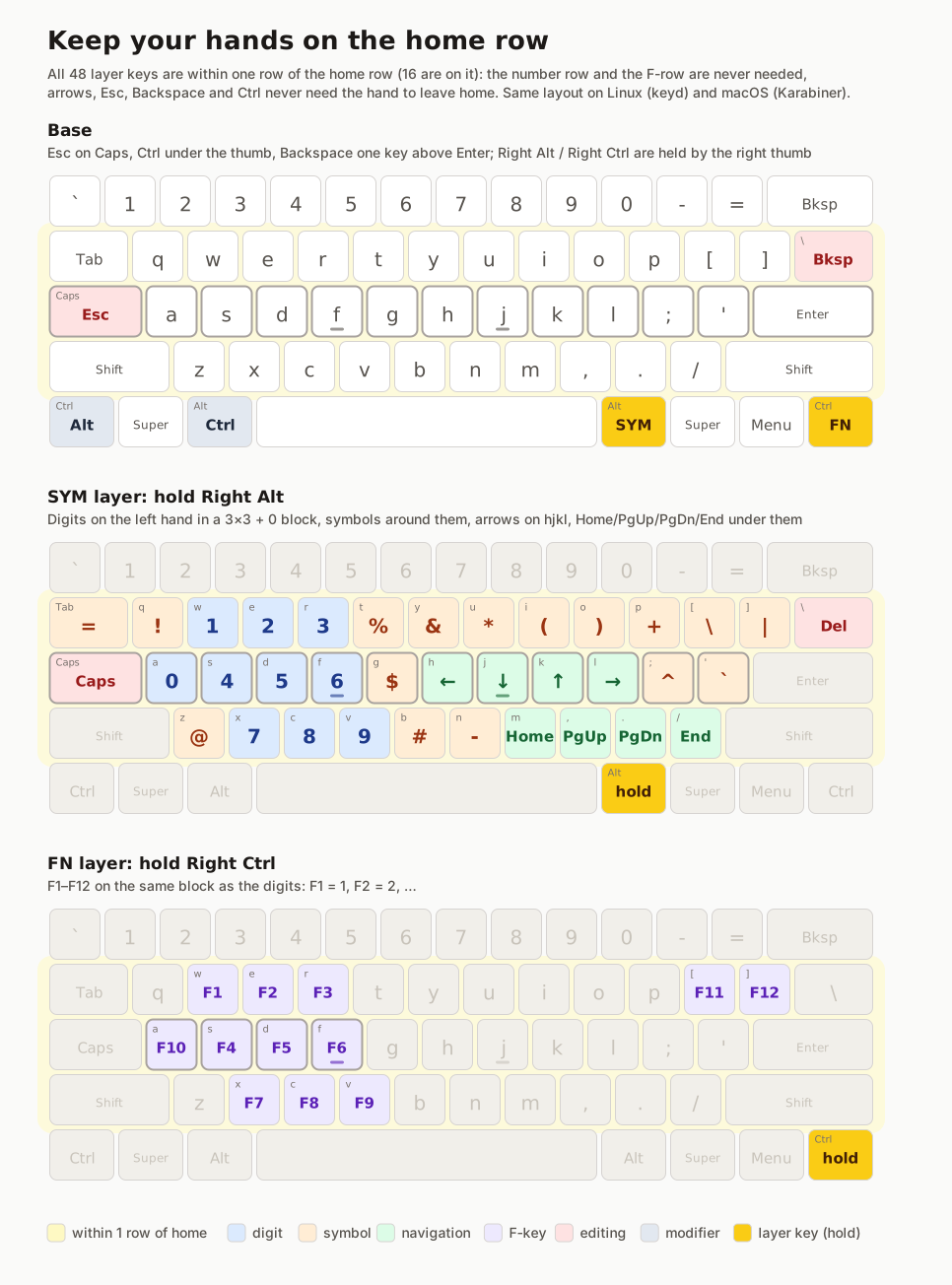
Changing things
$HOME is a symlink into the repo (links.txt), so edit it in place and commit in its submodule. Scripts that edit these files must follow symlinks (sed -i --follow-symlinks), or the link becomes a plain file and the change leaves git.packages/apt.txt, Brewfile, tools.txt or opt.txt, and a row to SOFTWARE.md. Then run ./bootstrap.sh packages (or tools, opt).dotfiles/themes/NAME.conf, then run docs/build.py to refresh this site.git add dotfiles && git commit in personal-infra.Scripts
Small tools on $PATH: bar blocks, dmenu helpers, font switchers, the macOS helpers (dmenu, swallow, kitty windows), and the build scripts for things the package managers don't have.